In a world where online gaming, 4K streaming, and video calls are part of everyday life, your PC’s WiFi connection matters more than ever. If your signal is weak, speeds are slow, or you’re constantly dropping connections, your wireless adapter could be the culprit.
That’s where a WiFi card for your PC comes in. Unlike USB dongles or built-in adapters, a dedicated WiFi card can unlock faster speeds, stronger signals, and better overall performance, especially if you’re on WiFi 6 or WiFi 6E. Whether you’re building a gaming rig, upgrading an older desktop, or just want more reliable wireless, choosing the right WiFi card makes a big difference.
In this guide, we break down the best WiFi cards for PCs right now, including high-speed options for gamers, solid value picks for everyday use, and advanced models for future-proofing your network. You’ll see what matters most when choosing a card, how to install it, and why each pick made our list.
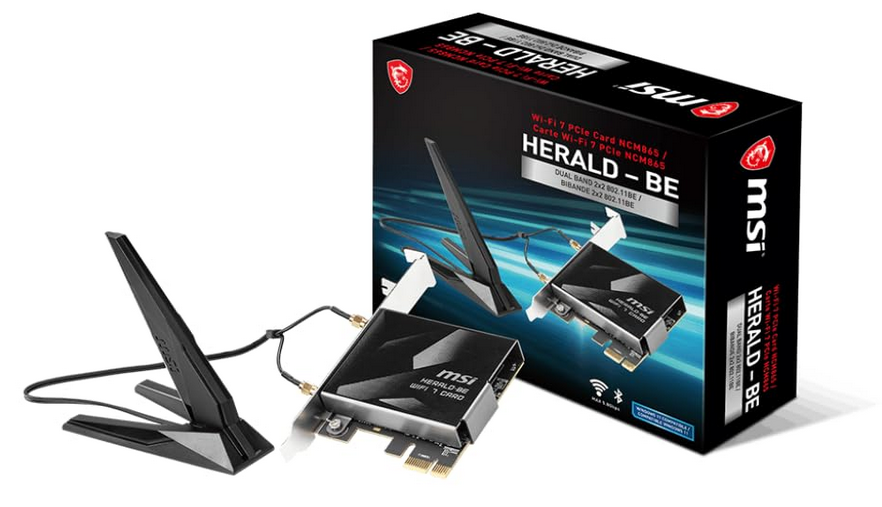
MSI Herald BE (WiFi 7)
Key Specifications
• Chipset: Qualcomm NCM865
• WiFi Standard: IEEE 802.11be (WiFi 7)
• Maximum Speed: Up to 5.8 Gbps
• Bands: Tri-band (2.4 GHz, 5 GHz, 6 GHz)
• Bluetooth: 5.4
• Channel Width: 320 MHz on 6 GHz
• Modulation: 4096-QAM
• Interface: PCIe
• Antennas: High-performance external antennas
Features Explained
The MSI Herald BE is a true next-generation WiFi card built on the WiFi 7 standard, designed for users who want the highest possible wireless performance on a desktop PC. By supporting the 6 GHz band along with ultra-wide 320 MHz channels and 4096-QAM modulation, this card can move significantly more data per second than WiFi 6 or WiFi 6E adapters. In real-world conditions, it is capable of delivering multi-gigabit speeds at close range while maintaining very strong performance even as distance increases, making it suitable for demanding setups.
This card stands out because of its strong real-world throughput consistency. It is engineered to sustain very high speeds on the 6 GHz band while keeping latency low, which is critical for competitive gaming, live streaming, and large file transfers over local networks.
The included high-performance antennas improve signal quality and stability, helping the card maintain strong links in environments with interference. For users who already have or plan to move to a WiFi 7 router, the MSI Herald BE represents one of the strongest all-around choices currently available.
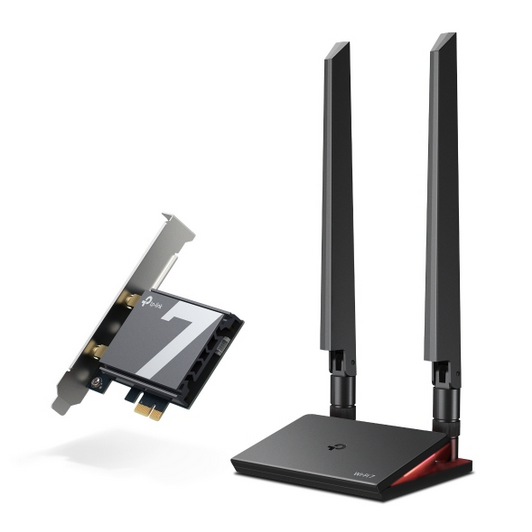
TP-Link Archer TBE550E (WiFi 7)
Key Specifications
• WiFi Standard: IEEE 802.11be (WiFi 7)
• Speed Rating: BE9300
• Maximum Speeds: Up to 5760 Mbps (6 GHz), 2880 Mbps (5 GHz), 688 Mbps (2.4 GHz)
• Bands: Tri-band (2.4 GHz, 5 GHz, 6 GHz)
• Bluetooth: 5.4
• Channel Width: 320 MHz on 6 GHz, 160 MHz on 5 GHz
• Modulation: 4096-QAM
• Interface: PCIe
• Antennas: Two high-performance tri-band antennas with magnetized base
Features Explained
The TP-Link Archer TBE550E is built around the newest WiFi 7 standard, which brings extremely wide channels, higher data density, and better traffic handling compared to previous generations. Its support for the 6 GHz band combined with 320 MHz channels allows it to move massive amounts of data with very low congestion. This makes a noticeable difference in environments where many devices compete for bandwidth, such as apartments, shared houses, or gaming setups with multiple connected systems.
One of its most advanced capabilities is Multi-Link Operation, which allows the card to use multiple frequency bands at the same time instead of switching between them. This improves stability, reduces sudden latency spikes, and can significantly increase total throughput when used with a compatible router.
The magnetized external antenna base allows flexible placement away from the PC case, improving real-world signal quality. Added features like WPA3 security, modern Bluetooth support, and included low-profile hardware make it a strong choice for high-end Windows 11 systems.
Gigabyte GC-WBAX210 (WiFi 6E)

Key Specifications
• Chipset: Intel AX210
• WiFi Standard: IEEE 802.11ax (WiFi 6E)
• Maximum Speed: Up to 2402 Mbps
• Bands: Tri-band (2.4 GHz, 5 GHz, 6 GHz)
• Bluetooth: 5.2
• Channel Width: Up to 160 MHz
• Interface: PCIe
Features Explained
The Gigabyte GC-WBAX210 uses Intel’s widely trusted AX210 chipset, which is known for its stability, efficient drivers, and consistent performance across different system builds. Its biggest advantage is support for the 6 GHz band, which opens access to a much cleaner wireless spectrum compared to traditional 2.4 GHz and 5 GHz networks.
This results in smoother speeds, fewer random drops, and noticeably lower latency when connected to a compatible router. Although it does not use the newest WiFi 7 standard, WiFi 6E is still extremely powerful for modern internet connections.
The card supports wide 160 MHz channels and dual-stream wireless operation, allowing it to deliver strong real-world throughput for gaming, 4K streaming, large downloads, and cloud workloads. For users who want tri-band performance without jumping to the newest generation, this card remains one of the most balanced options available.
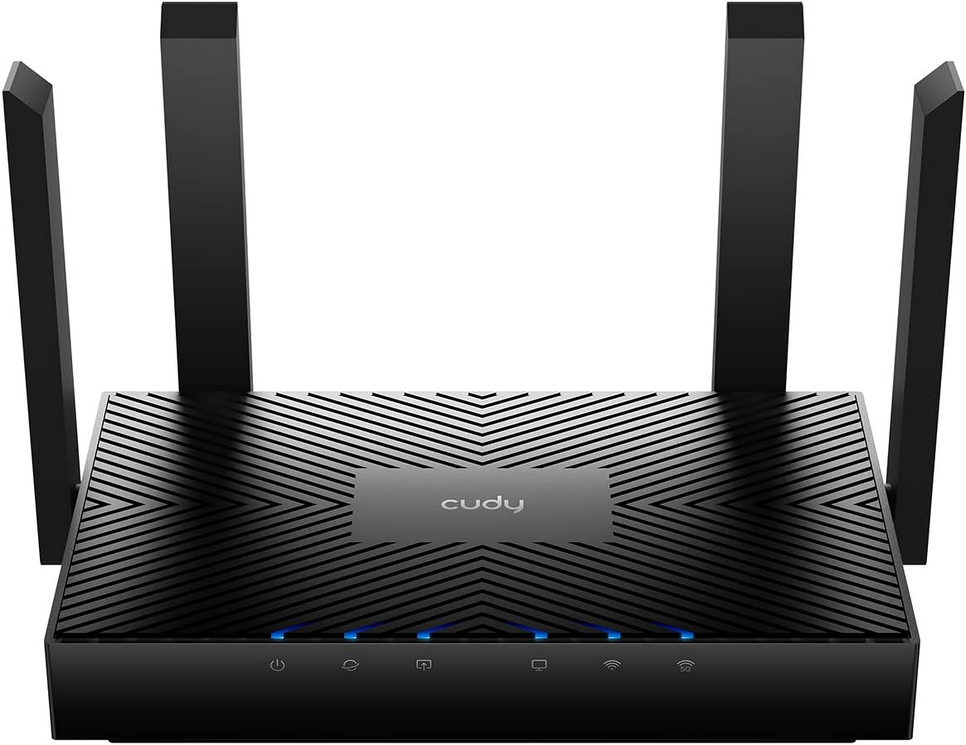
Cudy AX3000 (WiFi 6)
Key Specifications
• Chipset: Intel AX200
• WiFi Standard: WiFi 6 (802.11ax)
• Speeds: Up to 2402 Mbps (5 GHz), up to 574 Mbps (2.4 GHz)
• Bands: Dual-band (2.4 GHz, 5 GHz)
• Bluetooth: 5.0
• Channel Width: 160 MHz
• Modulation: 1024-QAM
Features Explained
The Cudy AX3000 is built around the Intel AX200 chipset, which has earned a strong reputation for reliable performance and wide system compatibility. While it does not support the 6 GHz band, it still benefits from WiFi 6 improvements such as better efficiency, higher usable speeds, and stronger performance in busy wireless environments. This makes it a major upgrade for users coming from much older WiFi cards.
This card focuses on stability, security, and value-oriented performance. It supports modern WPA3 encryption, wide 160 MHz channels, and includes hardware for easy installation in both standard and smaller PC cases. For everyday workloads such as browsing, streaming, gaming, and file downloads, it delivers smooth performance without the cost or hardware requirements of newer wireless standards.
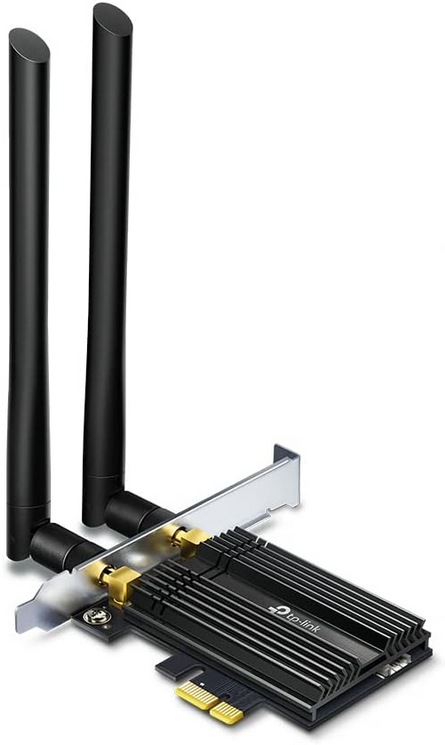
TP-Link Archer TX50E (WiFi 6)
Key Specifications
• Chipset: Intel WiFi 6 chipset (AX200 on early hardware revisions)
• WiFi Standard: WiFi 6 (802.11ax)
• Speeds: Up to 2402 Mbps (5 GHz), up to 574 Mbps (2.4 GHz)
• Bands: Dual-band (2.4 GHz, 5 GHz)
• Bluetooth: 5.0 on older versions, 5.2 or 5.3 on newer versions
• Channel Width: 160 MHz
• Modulation: 1024-QAM
• Antennas: Two 5 dBi high-gain dual-band antennas
Features Explained
The TP-Link Archer TX50E is designed for users who want dependable WiFi 6 performance with strong signal quality. Its dual high-gain antennas improve reception and stability, especially in rooms where signal strength is inconsistent. The specialized heatsink helps maintain performance under long gaming sessions, downloads, or streaming workloads by keeping the chipset cooler and more stable.
This card supports modern security protocols, wide channels, and updated Bluetooth versions depending on hardware revision. It is well suited for gaming, daily productivity, and home entertainment systems. One important point is to verify the hardware version before buying, since chipset choice can vary between revisions. When paired with a good router, the TX50E delivers consistently strong performance for most modern PC users.
WiFi Card Comparison
All of the WiFi cards covered in this guide are solid products, but they are built for very different types of users. Understanding where each one fits makes choosing much easier.
The MSI Herald BE and TP-Link Archer TBE550E sit at the top tier. They are true WiFi 7 adapters designed for users who want maximum wireless speed, access to the clean 6 GHz band, and the best possible future readiness.
These are best paired with WiFi 7 routers and high-speed internet connections. Between the two, the MSI focuses heavily on raw performance and value, while the TP-Link model adds advanced technologies like Multi-Link Operation and flexible external antenna placement.
The Gigabyte GC-WBAX210 represents the sweet spot for most people. WiFi 6E already delivers a huge leap over older standards by opening the 6 GHz band. This card provides excellent real-world performance, strong driver stability through Intel’s AX210 chipset, and tri-band operation without the higher hardware requirements of WiFi 7. For gaming, remote work, and high-speed home networks, it remains an extremely practical choice.
The TP-Link Archer TX50E and Cudy AX3000 cover the mainstream and budget segments. Both use Intel’s AX200 platform and deliver strong WiFi 6 performance. The TX50E stands out for better antennas and thermal design, making it more suitable for gaming systems and long high-load sessions. The Cudy AX3000 focuses on value and reliability, making it a very good upgrade option for older desktops and office systems.
A simple way to choose is this
- If you want cutting-edge performance and long-term future readiness, go WiFi 7.
- If you want the best balance of performance, stability, and modern features, WiFi 6E is ideal.
- If you want a major upgrade from older cards without overspending, WiFi 6 still delivers excellent real-world results.
How to Select the Best WiFi Card for Your PC?
Choosing the best WiFi card starts with understanding your current and future needs. The most important factor is the WiFi standard your router supports. A modern card can only perform at its full potential if your router can match it.
If your router supports WiFi 6E or WiFi 7, selecting a card with 6 GHz support immediately improves speed consistency, lowers interference, and unlocks newer technologies like wider channels and improved traffic handling. If your router is older, even a good WiFi 6 card can still deliver a major improvement over built-in or outdated adapters.
The next key point is hardware quality. Not all WiFi cards with similar speed ratings perform the same in real environments. Chipset reliability, antenna design, and supported channel width strongly influence everyday experience.
Cards with external high-gain antennas generally maintain stronger and more stable connections, especially when your PC is not very close to the router. Wider channel support allows more data to move at once, directly affecting download speed and responsiveness. These factors often matter more than theoretical maximum numbers printed on the box.
Finally, always consider operating system compatibility and long-term use. Some advanced WiFi cards require specific versions of Windows to unlock features such as 6 GHz access or newer WiFi standards. Driver support also plays a major role in stability, performance, and future updates.
A well-chosen WiFi card should not only fix today’s problems but also remain useful when you upgrade your internet plan, router, or connected devices. Thinking one or two years ahead often makes the difference between a short-term fix and a truly good upgrade.
Common problems caused by weak or outdated WiFi cards
Most people blame their internet provider or router when their connection feels slow or unstable. But in reality, a very large number of WiFi problems start inside the PC itself. An old or low-quality WiFi card quietly limits what your system can do, even if you are paying for a fast connection and using a modern router.
One of the most common issues is not reaching your actual internet speed. Older WiFi cards often use outdated standards and narrow channel widths. This means they physically cannot move data fast enough. Even if your internet plan and router support very high speeds, a weak card becomes the bottleneck. The result is slower downloads, longer update times, and buffering that should not be happening.
Another major problem is unstable connections. Outdated cards usually operate only on crowded 2.4 GHz or 5 GHz bands. These frequencies are full of interference from nearby networks, Bluetooth devices, wireless cameras, and even microwaves. When your card cannot access cleaner spectrum like the 6 GHz band or switch efficiently between channels, you experience random drops, sudden speed loss, and websites failing to load until you reconnect.
High latency and lag spikes are also classic symptoms. Weak WiFi cards struggle with packet handling and modern traffic patterns. This shows up most clearly in online games, voice chats, and live streams. You might have a “strong signal” but still experience delayed actions, rubber-banding, robotic voice audio, or frozen video calls. These are not just router issues. They are often hardware limits of the adapter itself.
Finally, there is the future problem. Even if your connection feels “okay” today, a weak WiFi card locks your PC to the past. When you upgrade your router, move to faster internet, or start using more connected devices, your system will fall behind immediately. The card becomes the ceiling that everything else hits.
In short, a weak WiFi card does not just reduce speed. It affects stability, responsiveness, compatibility, and long-term usability. Upgrading it often fixes problems people struggle with for years without realizing the real cause.
Final Verdict
A WiFi card upgrade is one of the most overlooked PC improvements, yet it directly affects speed, latency, stability, and everyday reliability. Whether you are gaming, working, streaming, or building online projects, your wireless adapter quietly defines how smooth your experience feels.
If your goal is maximum performance and future proofing, WiFi 7 cards like the MSI Herald BE and TP-Link Archer TBE550E are clearly ahead. They unlock the newest wireless technologies, extremely wide channels, and multi-gigabit capabilities that older cards simply cannot reach.
If you want the most balanced and practical upgrade, the Gigabyte GC-WBAX210 is the strongest overall choice for most users. Tri-band support with access to 6 GHz delivers cleaner connections, better speeds, and noticeably lower latency without requiring the newest ecosystem.
If your focus is value, stability, and a strong step up from outdated hardware, WiFi 6 cards like the TP-Link Archer TX50E and Cudy AX3000 still offer excellent performance for modern homes and offices.
In the end, the best WiFi card is not just the fastest one on paper. It is the one that matches your router, your operating system, and how you actually use your PC. Choosing the right card removes hidden bottlenecks, makes your connection feel instantly better, and prepares your system for the wireless demands of the next several years.